
Transfer: organize parking - airport shuttles
Learn how to configure key times, define resources such as vehicles and drivers, create outbound and return trips, and send the list to the driver by WhatsApp to coordinate shuttles between the parking facility and the airport.
Step-by-step video
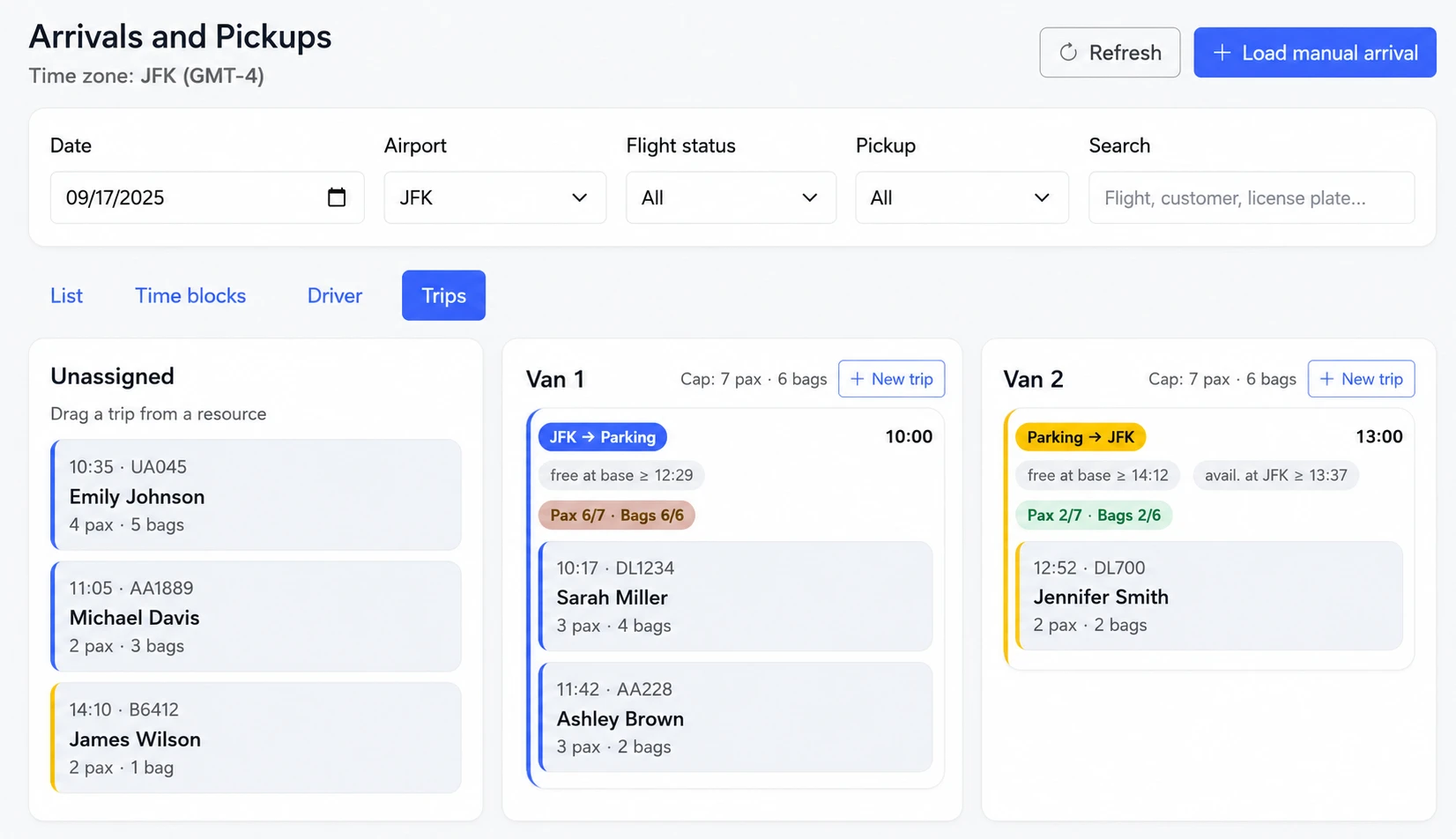
Manage trips, assign passengers, and control statuses from a single screen.
Quick steps
- Configure transfer times, lead time, and airports when applicable.
- Define resources: vehicles or vans and drivers, with passenger and luggage capacity.
- Check the confirmed reservations for the day, whether paid, deposited, or cash payment.
- Create the outbound or return trip: choose resource and estimated time.
- Assign passengers to the trip until capacity is reached; it can be forced if needed.
- Send the list to the driver by WhatsApp, including passenger contact details.
- Update the transfer status: pending -> on the way -> completed.
Suggestions:
- Define realistic times according to distance and vehicle type.
- Keep flight times updated if there are schedule changes.
- Use capacity to avoid over-assignments and improve punctuality.
Quick questions
Yes, it can be forced, although the ideal is to respect capacity for safety and organization.
You can edit the time in the reservation and adjust the trip based on that change.